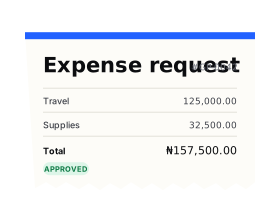





Expense request
№ EXP–0248| Description | Qty | Amount |
|---|---|---|
| TravelReturn flight · Lagos to Abuja | 01 | 125,000.00 |
| SuppliesProject materials · 3 items | 03 | 32,500.00 |
| MealsTeam lunch · 4 people | 04 | 12,500.00 |
Manage business expenses from the first request to final retirement. Bring approvals, disbursements, receipts, and project spending together in one workspace.
Give employees a clear process and finance the visibility to follow spending from start to finish.
Expense requests
Request funds for upcoming expenses or submit a reimbursement for money already spent. Keep the purpose, category, attachments, and linked work together.
Create expense and reimbursement requests.
Attach receipts and supporting documents.
Link spending to the relevant work or project.
Follow requests and approval progress.
Approvals
Give approvers the information they need to review spending. Keep approved amounts, comments, and decisions connected to the request.
Follow approval stages in a shared timeline.
Review the request, policy, and supporting documents.
Approve an amount or decline with feedback.
See which stage a request has reached.
Disbursements
Disburse approved funds from the organization wallet or record payments completed outside Gopaddi. Track how much has been approved, paid, and remains outstanding.
Fund an eligible employee wallet card.
Record external payments with references and proof.
Track partial disbursements and remaining balances.
Keep payment documents alongside the expense.
Expense retirement
Help employees account for the funds they receive. Capture actual expenses, attach supporting receipts, and submit the breakdown for finance review.
Record individual expenses and the dates they occurred.
Compare actual spending with disbursed funds.
Identify unused balances and refunds due.
Track retirement deadlines and overdue requests.
Return submissions for correction when needed.
Projects, people, and spending. All in one place.
Keep every trip connected to its request and policy.
Daily rates and partial days, accounted for.

Create project and subproject allocations.

Add members and connect related requests.

Review project-level spending and activity.

Manage project completion and cancellation.
Integrations
Bring ERP, HR, Microsoft, and Oracle connections into your expense process. Keep people and financial records connected.
Approval workflows
Let makers prepare requests and checkers review them. Give each approval a clear owner before funds are released.
Corporate cards
Connect corporate card spending to limits, expense requests, and receipts, with a clear view of what is available.
Policies and rules
Set spending limits, require receipts, and define approval and retirement rules before a request moves forward.
Yes. Employees can create requests for upcoming expenses or submit reimbursements for expenses already paid.
Yes. Finance can record completed external payments with the amount, payment date, reference, and supporting proof.
It means accounting for disbursed funds by submitting actual expenses and receipts for review, including any unused balance.
Yes. Project and subproject allocations connect members and related expense requests.
The policy configuration covers spending limits, receipts, approvals, disbursements, and retirement requirements.
Yes. Employees can create requests for upcoming expenses or submit reimbursements for expenses already paid.